
UBIQUITI UNIFI ACCESS FOR AUTOMATIC GATES
Ubiquiti Gate Access Installation Perth
Smart gate entry with intercom, mobile access, PIN, NFC and optional licence plate recognition.
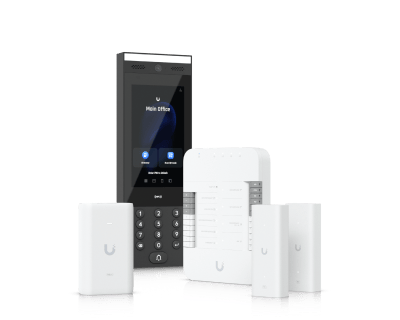
Western Technology designs and integrates UniFi Access gate systems for Perth homes, offices, warehouses, commercial sites and secure vehicle entries. We can connect the UniFi Gate Hub to a compatible existing gate operator, add a visitor intercom, set up user access and integrate supported UniFi Protect cameras.
Perth metro • Existing gate integration • UniFi Access setup • Network and PoE cabling

Vehicle Entry
Control compatible automatic gates through UniFi Access.
Visitor Intercom
See, speak with and release visitors from the UniFi platform.
Automatic Gate Integration
Connect UniFi Access to compatible sliding, swing, barrier or garage gate operators.
Multiple Entry Methods
Use intercom, PIN, NFC, keyfob, mobile credentials and supported digital wallet access.
Optional Plate Recognition
Pair with a compatible UniFi Protect AI camera for authorised licence plate entry.
One UniFi Platform
Manage users, access schedules, events and supported cameras from the UniFi ecosystem.
GATE ACCESS WITHOUT THE OLD ACCESS CONTROL COMPLEXITY
What Is UniFi Gate Access?
UniFi Access is Ubiquiti’s access control platform. For gates, the Gate Hub connects the UniFi system to a compatible gate operator and access devices. The gate can then be released according to the rules you set in UniFi Access.
The platform is useful when you want more control than a basic remote control or keypad can provide. Staff, residents, contractors and visitors can be given different access methods and schedules, while access events are recorded for easier administration.
- Add and remove users without changing the gate hardware
- Create access schedules for staff, contractors or deliveries
- Answer visitors through a gate intercom
- Use supported mobile, NFC, PIN and wallet credentials
- Integrate supported UniFi Protect cameras
- Expand later to doors, pedestrian entries and other UniFi Access areas
GOOD FIT FOR
Sites That Need Controlled Vehicle Entry
- Warehouses and industrial yards
- Office car parks
- Commercial driveways
- Apartment and strata entries
- Gated homes and acreage properties
- Workshops, depots and secure compounds
Important: UniFi Access normally controls the access decision. It does not replace the gate motor, mechanical gate, required safety devices or mains electrical infrastructure.
SUPPORTED GATE APPLICATIONS
One Gate Hub, Several Gate Types
Ubiquiti documents support for common gate and garage entry types. Final compatibility depends on the gate operator inputs, safety setup and site wiring.
Sliding Gates
Integrate with a compatible sliding gate operator for controlled vehicle entry.
Swing Gates
Suitable for supported single or double leaf swing gate operator arrangements.
Barrier Gates
Useful for car parks, depots, staff entries and controlled vehicle lanes.
Roll-Up Garage Doors
Supported operator arrangements can be brought into the same Access workflow.
Pedestrian Side Door
A Gate Hub can also support one pedestrian side door in the same gate area.
SIMPLE FROM THE USER SIDE
How UniFi Gate Access Works
The technology behind the system is detailed, but the day-to-day experience is simple.
01
Visitor or User Arrives
A person or vehicle arrives at the gate and uses the configured entry method.
02
Identity Is Checked
UniFi Access checks the approved credential, PIN, visitor action or supported plate rule.
03
Gate Hub Triggers the Operator
The Gate Hub sends the configured relay action to the compatible gate operator.
04
Gate Safety Still Applies
Position sensing, auto-close logic and entrapment protection remain part of the gate safety design.
05
Event Is Recorded
The access event is recorded, with supported Protect video integration available where configured.

THE CORE GATE SYSTEM
Gate Hub + Intercom + Network
A typical UniFi gate access deployment centres on the Gate Hub. The hub interfaces with the gate operator, while a connected UniFi reader or intercom handles the user interaction. Current G3 gate kits add the G3 Intercom and include PoE hardware designed to make the gate-side network connection easier.
- Gate Hub for gate control and inputs
- G3 Intercom option for visitor calling and access
- PoE connectivity for UniFi Access devices
- Two-wire PoE extender option for suitable retrofit cable paths
- Compatible UniFi Console running the Access application
- Existing or new compatible gate operator and safety equipment
We select the final hardware after checking your gate operator, cable route, existing UniFi equipment and the access methods you want to use. This avoids quoting a kit that does not suit the actual gate.
CHOOSE THE ENTRY EXPERIENCE
Ways People Can Open the Gate
You do not have to use every method. We configure the methods that make sense for the people using the site.
Intercom Release
A visitor calls from the gate. An authorised receiver can speak with them and release the gate.
PIN
Supported intercoms and readers can allow PIN-based entry for approved users.
NFC Card or Keyfob
Issue cards or keyfobs to staff, residents or regular contractors.
Mobile Unlock
Authorised users can use supported UniFi mobile access methods.
Apple / Google Wallet
Current G3 products support Ubiquiti Touch Pass wallet credentials, subject to Ubiquiti terms.
Licence Plate Recognition
With a compatible UniFi Protect AI camera and correct gate safety setup, authorised plates can trigger entry.
QR Code
Supported G3 intercom hardware can use QR code unlock for suitable visitor workflows.
Face Unlock
Supported G3 intercom hardware includes face unlock. Use should match your site policies and privacy requirements.
HANDS-FREE VEHICLE ENTRY
Licence Plate Recognition for Approved Vehicles
UniFi Access can use Ubiquiti License Plate Unlock with a compatible UniFi Protect AI camera. When an authorised plate is detected in the configured zone, the system can release the gate according to the site rules.
- Useful for staff and resident vehicles
- No remote control to hand between regular users
- Plate rules can be managed from the UniFi environment
- Supported video can provide context around gate events
- Compatible camera model and positioning are checked during design
Safety matters: Ubiquiti requires the gate installation to meet the relevant Gate Hub safety prerequisites for supported plate unlock scenarios. This can include gate position sensing and entrapment protection devices depending on the control method.
Example
Staff Car Park Entry
An approved staff vehicle approaches the gate. A compatible Protect AI camera reads the plate. UniFi Access checks the plate rule. If the conditions are met, the Gate Hub triggers the gate operator and records the event.
Visitors can still use the intercom instead of having permanent vehicle access.

VISITORS DO NOT NEED A PERMANENT CREDENTIAL
A Smarter Gate Intercom Experience
A UniFi Access intercom can sit at the vehicle entry so visitors can contact the people responsible for letting them in. The current G3 Intercom combines a camera, touchscreen, speaker and microphone with multiple access methods in one outdoor device.
- Two-way visitor audio
- Integrated camera
- PIN and NFC access
- Supported mobile and wallet credentials
- QR code unlock support
- Outdoor-rated hardware
The exact call workflow depends on how you want reception, staff or residents to receive visitor calls. We configure this during commissioning and show the nominated users how to operate it.
BEFORE ANYTHING IS ORDERED
We Check the Existing Gate First
Gate access projects are much easier when the existing gate operator, cable path and safety equipment are understood before hardware is selected.
Gate Operator Inputs
We confirm how the existing gate controller accepts an open or trigger command.
Network Path
We check how Ethernet or suitable retrofit connectivity can reach the gate equipment.
PoE Power
The Gate Hub, intercom and readers need the correct PoE power design.
Gate Status
Position sensing may be required so the access system knows whether the gate is open or closed.
Safety Devices
Entrapment protection and the gate operator safety system must remain correctly designed and operational.
Mounting Location
We plan intercom height, driver reach, sun exposure, cable entry and tamper resistance.
DAY-TO-DAY ADMINISTRATION
Manage Gate Access Without Reprogramming the Gate Motor
Once the hardware is commissioned, most day-to-day access changes happen in UniFi Access rather than at the gate controller. This is useful when staff change, contractors need temporary access or different groups need different schedules.
- Create users and groups
- Apply access schedules
- Remove credentials when people leave
- Review access events
- Configure visitor workflows
- Manage multiple UniFi Access locations where the environment supports it
PLATFORM NOTE
A Compatible UniFi Console Is Required
UniFi Access runs on a compatible UniFi Console. If you already use UniFi networking or Protect, we can check whether your existing console is suitable. If not, the required controller platform can be included in the design.
The UniFi Access application itself is described by Ubiquiti as license-free. Optional commercial features such as Touch Pass digital wallet credentials can have separate current terms, so these are confirmed at quote time.
- Existing UniFi environment can be assessed
- New console can be included where required
- Access and Protect can share the wider UniFi ecosystem
GATE ACCESS IS NOT THE SAME AS GATE AUTOMATION
Access Control Must Work With the Gate Safety System
UniFi Access can decide when an authorised user is allowed through the gate, but the gate operator and safety system still control the physical movement of the gate. We do not bypass required safety devices to make access control work.
Position Sensing
Allows the access system to understand gate open or closed status where the chosen control method requires it.
Entrapment Protection
Safety devices remain part of the gate design and can be required for supported Gate Hub functions.
Licensed Trades Where Required
Regulated security, electrical and gate automation work must be completed under the appropriate WA licensing arrangements.
THE GATE STILL NEEDS A RELIABLE NETWORK PATH
PoE, Cabling and Network Integration
The UniFi Access hardware at the gate needs a reliable network and power design. Depending on the site, that might mean new Cat6, an existing suitable cable, a protected outdoor path, or Ubiquiti’s two-wire PoE retrofit hardware where appropriate.
- Cat6 and structured cabling where suitable
- PoE switch or injector capacity check
- Outdoor cable routing and weather protection
- Gate cabinet or hub placement
- VLAN and network configuration where required
- Testing and labelling before handover
Why the network matters
A gate access system is only as good as the physical installation behind it. Poor cable routes, weak PoE design or water exposure can turn a good access platform into an unreliable entry point.
Our quote separates the network and access-control requirements so you can see what is needed at the gate, what can be reused and what needs to be added.
MORE THAN JUST A VEHICLE GATE
The Wider UniFi Access Range
A gate can be the first part of a larger UniFi Access system. The same platform can expand to office doors, secure rooms, pedestrian entries and supported elevator access.

G3 Starter Kit
Single door entry with the current G3 reader generation.

G3 Starter Kit Pro
Single door entry and exit control with two readers.

G2 Starter Kit
Earlier G2 single-door kit still represented in the current Access range.

G2 Starter Kit Pro
Earlier G2 two-reader door kit for entry and exit control.

Elevator Starter Kit
Access control for authorised floor selection in supported elevator deployments.
Product generations and availability change over time. We quote current hardware that suits the site rather than locking the design to a specific kit shown on this page.
TYPICAL PERTH APPLICATIONS
Where UniFi Gate Access Makes Sense
The best use case is a site that wants easier user management and a cleaner connection between gate access, networking and video.
Warehouses & Yards
Control staff and delivery vehicle entry, add visitor calling and keep access events in one system.
Office Car Parks
Give staff individual access while keeping visitor entry through an intercom workflow.
Strata & Apartments
Manage resident and visitor access around a shared vehicle entry, subject to strata requirements.
Homes & Acreage
Replace a basic gate remote-only workflow with intercom, mobile and selected user credentials.
Depots & Workshops
Use schedules for staff, contractors and service vehicles at controlled entries.
Multi-Building Sites
Combine gate access with UniFi networking, cameras and door access where the broader site design suits it.
FROM GATE TO WORKING SYSTEM
Our Gate Access Installation Process
We plan the system around the gate that is actually on site, not around a generic kit diagram.
01
Site Check
We inspect the gate operator, control inputs, network path, mounting position and existing safety devices.
02
System Design
We choose the Gate Hub, intercom or reader, controller, PoE, camera and cabling needed for the job.
03
Cabling & Hardware
Network and access-control equipment is installed, with regulated work completed under the required licensing arrangements.
04
UniFi Configuration
We adopt the devices, set gate behaviour, users, schedules, entry methods and supported Protect integration.
05
Testing & Handover
We test normal access, visitor entry, safety-related behaviour and the admin workflow before handover.
GET A MORE ACCURATE QUOTE
What to Send Us About Your Gate
A few details can usually tell us whether the project is straightforward or needs a site visit before quoting.
Gate Details
Gate type, operator brand/model and whether it is already automated.
Site Photos
One wide photo of the gate and a clear photo of the gate controller or motor cabinet.
Cable Distance
Approximate distance from the nearest network or building to the gate.
Entry Methods
Tell us if you want intercom, PIN, mobile, NFC, wallet credentials or plate recognition.
Existing UniFi
Let us know if you already have UniFi networking, Protect cameras or a UniFi Console.
Visitor Workflow
Who should answer the gate and who should be able to release it.
FREQUENTLY ASKED QUESTIONS
Ubiquiti Gate Access Perth FAQs
Straight answers to the questions we expect before a gate access project is quoted.
Often, yes, if the existing gate operator has a compatible control input and the overall safety setup suits the required control method. We check the operator and wiring before confirming the design.
No. UniFi Access normally controls the access decision and sends the configured trigger to a compatible gate operator. The gate motor, mechanical gate and safety system remain separate parts of the installation.
Depending on the selected hardware, options can include intercom release, PIN, NFC card, keyfob, mobile unlock, Ubiquiti Touch Pass wallet credentials, QR code, face unlock and supported licence plate recognition.
Yes. A UniFi Access intercom can be configured for visitor calls so nominated users can speak with the visitor and release the gate when appropriate.
UniFi Access supports License Plate Unlock when the Gate Hub is paired with a compatible UniFi Protect AI camera and the deployment meets Ubiquiti’s required software, hardware and gate safety conditions.
Ubiquiti documents support for one pedestrian side door from a Gate Hub. The door hardware and locking method still need to be assessed for the site.
You need a compatible UniFi Console running UniFi Access and the required network and PoE connectivity. If you do not already have suitable UniFi equipment, the required platform can be included in the project design.
Ubiquiti describes the UniFi Access application as license-free. Optional services and commercial features, including Touch Pass terms, can change and are confirmed at the time of quoting.
Yes. UniFi Access can integrate with supported UniFi Protect devices for video context and certain features such as supported licence plate entry. Exact camera compatibility is checked against the current Ubiquiti requirements.
UniFi Access is hosted on a compatible UniFi Console at the site. Remote features depend on the network and internet path. We test the intended local and remote operation during commissioning so you understand how your specific deployment behaves.
Yes. UniFi Access supports separate hubs for doors, gates and elevators, and the same deployment can be expanded where the site design and console capacity support it.
Access control and electrical work can be regulated in Western Australia. The final scope must be delivered under the appropriate WA security, electrical and cabling licensing arrangements. Any mains gate power or gate operator work is coordinated with the relevant licensed trade where required.
RELATED WESTERN TECHNOLOGY SERVICES
The Gate Is Part of the Wider Network
Many gate access projects also need network, PoE or long-distance connectivity work. These services can be scoped together where it makes sense.
Data Cabling Perth
Cat6, cabinets and communications cabling for the network side of the gate project.
Office Network Setup
Switching, PoE, VLANs and network design for business sites using UniFi.
Point to Point WiFi
Useful when a remote gate or outbuilding needs a network path and cabling is impractical.
Starlink Installation
Connectivity options for selected remote or semi-rural properties where fixed services are limited.
PLANNING A UNIFI GATE ACCESS SYSTEM?
Send Us Your Gate Details for a Practical Quote
We can review the gate, access methods, network path and existing UniFi equipment before recommending the hardware.
Tell us about the gate
- Gate type and gate operator brand/model
- Perth suburb or site location
- Wide gate photo and controller photo
- Approximate network-to-gate distance
- Preferred entry methods
- Whether UniFi is already installed
Phone: +61 8 6102 2010
Email: info@westerntechnology.com.au
Email: info@westerntechnology.com.au
Ubiquiti and UniFi are trademarks of Ubiquiti Inc. Western Technology is an independent technology integration provider unless otherwise stated. Product features and availability can change. Final design is confirmed against current Ubiquiti documentation and site requirements.