

The most effective approach to phishing training for employees is a continuous, tailored programme that combines realistic simulated phishing campaigns with business-specific policies, measurable remediation, and clear escalation paths. A one-off annual session does not move the needle. What works is building a system where staff encounter realistic scenarios regularly, know exactly how to report suspicious messages, and receive targeted follow-up when they slip.
Start this week with these four elements:
- Onboarding module: Every new employee completes a phishing awareness module before they touch a live inbox.
- Quarterly simulations: Run simulated phishing campaigns regularly throughout the year, varying the scenario type each round.
- Incident reporting path: Give staff a single, frictionless way to report suspicious emails, and make sure they know it.
- Privileged-user ringfencing: Finance, HR, executives, and IT admins receive additional, role-specific training and more frequent simulations.
The ACSC small business cyber security guide frames employees as the first line of defence and recommends periodic refreshers alongside business-specific policies. If you lack the internal capacity to design, run, and measure this yourself, a local managed IT provider such as Westerntechnology can handle delivery, simulation scheduling, and KPI reporting on your behalf.
Key takeaways
A continuous, tailored phishing training programme that pairs realistic simulations with measurable remediation and clear escalation paths is the most effective way to reduce human risk in an Australian workplace.
| Point | Details |
|---|---|
| Start with a baseline simulation | Run an unannounced simulation before any training to establish your actual click and reporting rates. |
| Match cadence to role risk | Finance, HR, and executives need quarterly or monthly simulations; general staff need quarterly minimum. |
| Track reporting rate, not just click rate | A rising reporting rate shows staff are actively responding, not just avoiding clicks. |
| Integrate with policy and onboarding | Phishing training embedded in induction and cybersecurity policy produces sustained behaviour change. |
| Westerntechnology delivers managed programmes | Westerntechnology handles simulation design, Microsoft 365 integration, KPI reporting, and incident escalation for Perth SMBs. |
Table of Contents
- What does effective phishing training actually do?
- How do you implement a phishing training programme?
- How do you design realistic simulated phishing campaigns?
- How do you measure whether phishing training is working?
- How should you tailor training by role and risk level?
- What do managers commonly get wrong?
- What Australian and free resources can you use right now?
- How does a Perth managed IT provider run a measurable programme?
- How does phishing training fit into your broader cybersecurity policy?
- What happens when a phishing attack succeeds despite training?
- What are the legal and compliance requirements in Australia?
- How do you keep staff engaged with phishing awareness over time?
- Westerntechnology’s cybersecurity services for Perth businesses
- The gap between awareness and behaviour change
- Sources
What does effective phishing training actually do?
Phishing awareness training is not a slide deck employees click through once a year. At its core, it is a programme that builds three capabilities: recognising attack signals, responding correctly in the moment, and reporting what they see. The ACSC guide is explicit that phishing frequently targets small businesses through credential theft and invoice fraud, which means training must map to the actual decisions staff make every day.
Concrete learning objectives for any programme:
- Spot red flags in emails: mismatched sender domains, urgency cues, unexpected attachments, and unusual payment requests.
- Validate invoices and payment-change requests through a second channel before acting.
- Report suspicious messages through the designated path without deleting them.
- Follow the escalation procedure when something looks wrong.
MITRE ATT&CK mitigation M1017 recommends combining user training with simulated phishing exercises to measure susceptibility and then deliver targeted follow-up. That is the key distinction between a compliance exercise and a programme that actually reduces risk. Generic awareness content alone produces marginal improvements; research published by IEEE suggests detection rates improve meaningfully only when training is tailored, reinforced, and followed by remediation. The cyber.gov.au personnel security guidelines formalise this by requiring role-tailored content and an annual formal training cadence that includes incident reporting responsibilities.
How do you implement a phishing training programme?
A structured rollout prevents the most common failure mode: launching a simulation before staff know what to do with a suspicious email.
90-day rollout checklist:
- Scope and risk assessment (Week 1–2): Identify your highest-risk roles (finance, HR, executives), map the business processes most likely to be targeted (invoice approval, payment changes, credential resets), and set a baseline by running a silent initial simulation with no prior warning.
- Content selection (Week 2–3): Choose training modules that match your industry and the specific attack types your baseline reveals. Generic modules are a starting point; customise scenarios to reflect your actual suppliers, internal processes, and email conventions.
- Pilot group (Week 3–4): Run the programme with a small cross-functional group first. Collect feedback on scenario realism and module clarity before full rollout.
- Full rollout and onboarding integration (Week 4–6): Deploy the onboarding module for all new starters and schedule the first company-wide simulation.
- Simulation cadence (Ongoing): Run quarterly simulations minimum. High-risk roles get additional rounds. Vary the attack type each quarter.
- Remediation workflow (Post-simulation): Anyone who clicks a simulated phishing link receives immediate, contextual micro-training, not a shame email. Log completions.
- Governance and review (Month 3): Review click rates, reporting rates, and remediation completion. Adjust content and frequency based on results.
Pro Tip: Align training scenarios directly to your business decision points. If your accounts payable team processes supplier invoices, build a simulation around a fake supplier payment-change request. Staff who practise the right response in a realistic context retain it far better than those who complete a generic module.
CISA recommends running no-cost tabletop exercises between formal training rounds to keep awareness current without requiring a full simulation cycle.
How do you design realistic simulated phishing campaigns?
The simulation is where the programme earns its keep. A poorly designed campaign either insults staff with obvious fakes or demoralises them with traps that no reasonable person would catch. Neither outcome builds the behaviour you want.
Simulation types to rotate through:
- Credential harvesting: A fake login page mimicking Microsoft 365, a supplier portal, or a banking site.
- Invoice fraud: A spoofed supplier email requesting a payment-change or attaching a modified invoice.
- SMS and voice phishing (smishing/vishing): Text messages or calls impersonating the ATO, a bank, or an internal IT helpdesk.
- QR code scams: An email or printed notice directing staff to scan a QR code that leads to a credential page.
- Social engineering via LinkedIn or Teams: A message from a fake executive or vendor contact requesting urgent action.
Scenario design principles:
- Match the difficulty level to the cohort’s current skill. Start with moderately obvious scenarios, then increase realism as click rates fall.
- Use your own company’s branding conventions, supplier names, and internal language where possible. A simulation using a supplier your staff have never heard of teaches nothing.
- Never design a scenario that exploits a personal crisis (illness, bereavement, financial hardship). The goal is skill-building, not stress.
- Rotate templates every quarter so staff cannot pattern-match on format alone.
Ethical and consent considerations for Australian workplaces:
- Notify senior leadership and HR before any simulation runs. They do not need to know the exact date, but they must be aware the programme is active.
- Do not use simulation results to discipline staff. Use them to trigger training.
- Under the Privacy Act 1988 (Cth), simulation click data is personal information if it can identify an individual. Store it securely, limit access to those who need it for programme management, and include it in your data handling policy.
- Document the programme’s purpose and scope in your cybersecurity policy so staff understand simulations are a standard part of their employment conditions.
Pro Tip: Microsoft Attack Simulation Training, available within Microsoft 365 Defender, lets you schedule automated simulations, track click and report rates by user, and assign targeted training modules automatically. If your business already runs Microsoft 365, this is the lowest-friction starting point.
How do you measure whether phishing training is working?
Metrics turn a training programme into a risk management tool. Without them, you are running on faith.
Primary metrics to track:
- Click (fail) rate: The percentage of staff who click a simulated phishing link. A high rate at baseline is expected; the trend over time is what matters.
- Reporting rate: The percentage of staff who correctly report a simulated phishing email through the designated channel. This is the metric that shows active, confident behaviour, not just passive avoidance.
- Normalised reporting score / human risk score: A composite metric that weighs reporting rate against click rate to give a single programme health indicator. SANS recommends tracking this trend across simulation rounds as a maturity indicator.
- Remediation completion rate: The percentage of staff who complete assigned follow-up training after a simulation failure. Low completion signals a process problem, not a people problem.
- Repeat offenders: Staff who fail multiple consecutive simulations need individual coaching, not another group module.
Benchmark context: Organisations that run continuous, reinforced programmes typically see click rates fall significantly over the first 12 months compared to baseline. MITRE ATT&CK M1017 frames this measurable reduction in susceptibility as the primary evidence that training is reducing human risk.
When metrics show persistent risk in a specific team or role, the response is targeted coaching and role-specific scenario design, not a company-wide re-run of the same module. The SANS Security Awareness Maturity Model gives a useful progression framework: from compliance-focused (tick-the-box) through awareness-focused to behaviour-change-focused programmes. Most Australian SMBs start at level one and can reach level two within 12 months with consistent effort.
How should you tailor training by role and risk level?
Not every employee carries the same risk. A receptionist who handles inbound calls and a finance manager who approves wire transfers face entirely different attack profiles.
Cyber.gov.au guidelines are clear that privileged users require specialised, annual training separate from general staff content. Organisations that handle cardholder data also face additional training requirements under PCI DSS for payment-related roles.
| Role category | Training focus | Recommended cadence |
|---|---|---|
| General staff | Red flag recognition, reporting process, password hygiene | Annual formal training + quarterly simulation |
| Finance and accounts | Invoice fraud, payment-change verification, BEC scenarios | Quarterly training + monthly simulation |
| HR and recruitment | Fake CV attachments, credential phishing, data request scams | Quarterly training + quarterly simulation |
| Executives and senior managers | Whaling, impersonation, wire transfer fraud | Bi-annual deep-dive + monthly simulation |
| IT and privileged users | Credential harvesting, admin portal phishing, supply chain attacks | Annual formal + monthly simulation + technical controls review |
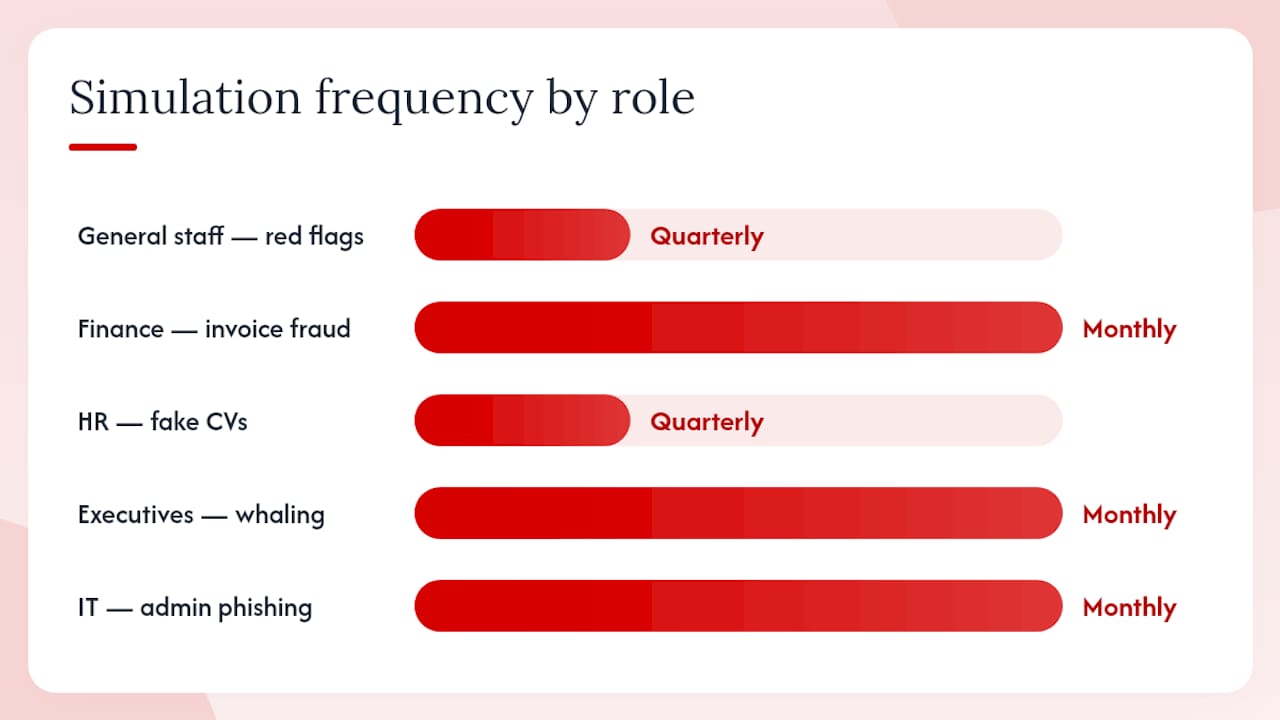
The cadence above reflects the principle that frequency should match exposure and consequence. A finance team member who approves payments frequently needs more practice than someone whose email is primarily internal. Role-based training also makes the content feel relevant, which directly affects retention.
What do managers commonly get wrong?
The most expensive mistake is treating phishing awareness training as a compliance checkbox. Run a module in July, tick the box, move on. Twelve months later, staff have forgotten everything and the business is no better protected.
What not to do:
- Run a single annual session and call it a programme.
- Use punitive simulations designed to catch people out and then publicise failures.
- Deploy generic, off-the-shelf templates that bear no resemblance to the emails your staff actually receive.
- Ignore the reporting process. If staff do not know how to report a suspicious email, or if reporting feels pointless, they will not do it.
- Skip executive buy-in. If leadership does not participate in simulations, staff read the message clearly.
What works instead:
- Continuous reinforcement: Short, frequent touchpoints outperform long, infrequent sessions. A two-minute scenario refresher every six weeks beats a 90-minute annual module.
- Contextualised scenarios: Build simulations around your actual suppliers, your internal systems, and the language your staff use. The ACSC guide specifically flags invoice fraud and credential theft as the attack types most likely to hit Australian small businesses.
- Measurement and iteration: Track click rates and reporting rates across every simulation round. Adjust content when a cohort’s metrics plateau.
- Blame-free culture: Staff who feel safe reporting mistakes report them faster. Fast reporting is what limits damage when a real attack lands.
- Executive participation: When the CEO completes the same simulation as the accounts team, the programme has credibility.
IEEE commentary on phishing training makes the point directly: generic, one-off training without reinforcement or targeted follow-up produces marginal improvements at best. The fix is not more training volume; it is better design and consistent follow-through.
What Australian and free resources can you use right now?
Several high-quality, no-cost resources are available to Australian businesses building or improving a programme.
- Cyber: The authoritative Australian government framework for role-based training cadence and content requirements. Use it to structure your policy and demonstrate compliance. First month action: map your role categories against the guidance and identify gaps.
- ACSC small business cyber security guide: A practical PDF covering staff awareness, invoice validation, and reporting. Readable by non-technical managers. First month action: distribute to all staff as a baseline awareness document and use the checklist to audit current practices.
- CISA phishing guidance: US-origin but directly applicable. Includes no-cost tabletop exercise templates for testing incident readiness between formal simulation rounds. First month action: run a 30-minute tabletop with your leadership team using the CISA scenario prompts.
- MITRE ATT&CK M1017: The technical framework for understanding how user training maps to specific attack techniques. Use it to justify your programme design to a board or auditor. First month action: cross-reference your simulation scenario types against the attack techniques M1017 addresses.
- SANS phishing awareness guidance: Programme maturity models, metric definitions, and reinforcement cadence recommendations. First month action: use the SANS maturity model to benchmark your current programme stage and set a 12-month target.
How does a Perth managed IT provider run a measurable programme?
Westerntechnology’s approach to phishing awareness for Perth SMBs follows a structured cycle that connects simulation data to real operational outcomes.
Programme flow:
- Discovery: Map the client’s role structure, highest-risk processes (invoice approval, payment authorisation, credential management), and existing Microsoft 365 configuration.
- Baseline simulation: Run an unannounced initial simulation to establish a click rate and reporting rate baseline before any training occurs.
- Training design: Build role-specific modules that reflect the client’s actual suppliers, internal language, and attack surface. Finance teams receive invoice fraud scenarios; IT staff receive admin portal credential harvests.
- Ongoing simulation schedule: Quarterly minimum for all staff; monthly for high-risk roles. Scenario types rotate each round.
- Automated remediation: Staff who click a simulated link receive an immediate, contextual micro-training module. Completions are logged and reported.
- Measurement and reporting: Monthly KPI dashboard shared with the client’s IT manager or business owner.
| KPI | What it measures |
|---|---|
| Click (fail) rate | Percentage of staff who engage with a simulated phishing link |
| Reporting rate | Percentage of staff who correctly report a simulated phishing email |
| Remediation completion | Percentage of failed-simulation staff who complete follow-up training |
| Training module completion | Percentage of assigned modules completed on schedule |
| Repeat fail rate | Percentage of staff failing two or more consecutive simulations |
Westerntechnology integrates the programme with Microsoft 365 configuration, including Safe Links, Safe Attachments, and mailbox reporting hooks, so the technical controls and the human training layer reinforce each other. Helpdesk escalation paths are mapped during discovery, so when a staff member reports a real suspicious email, the response workflow is already in place.
Pro Tip: Ask your managed IT provider to show you the baseline simulation results before any training runs. That single data point, your organisation’s raw click rate, is the most persuasive argument for sustained investment you will ever have.
Organisations that handle cardholder data can also use the programme to demonstrate training compliance under PCI DSS for payment-processing roles.
How does phishing training fit into your broader cybersecurity policy?
Phishing training does not sit in isolation. It works best when it is woven into the fabric of how your organisation manages security from day one of employment.
Onboarding integration: Every new employee should complete a phishing awareness module as part of their induction, alongside acceptable use policy sign-off and password management setup. This sets the expectation that security is a standard part of the job, not an optional extra.
Policy alignment: Your cybersecurity policy should explicitly reference the phishing training programme, including the simulation schedule, the reporting process, and the consequences of repeated failures (coaching, not discipline). Staff who know the policy exists are more likely to take the training seriously.
Microsoft 365 configuration: Technical controls and human training reinforce each other. Microsoft 365 Safe Links and Safe Attachments catch a significant proportion of malicious content before it reaches the inbox, but they do not catch everything, and they do not build the human judgement that stops a well-crafted social engineering attempt. Configure your tenant’s reporting settings so staff can flag suspicious emails directly from Outlook with a single click.
Annual policy review: Tie your phishing training programme review to your annual cybersecurity policy review. Update scenario types to reflect the current threat environment, adjust role categories as your team changes, and reset KPI targets based on the previous year’s performance.
What happens when a phishing attack succeeds despite training?
Training reduces the probability of a successful attack. It does not eliminate it. Every organisation needs a clear response plan for when someone clicks a real phishing link.
Immediate response steps:
- Contain: The affected staff member reports the click immediately through the designated channel. IT isolates the device from the network within minutes, not hours.
- Assess: Determine what credentials or data may have been exposed. Check for unauthorised logins, email forwarding rules, and data exfiltration indicators.
- Reset: Force password resets for the affected account and any accounts that share credentials. Enable or verify multifactor authentication.
- Notify: If personal data has been accessed or exfiltrated, assess notification obligations under the Privacy Act 1988 (Cth) and the Notifiable Data Breaches scheme. Breaches meeting the threshold must be reported to the Office of the Australian Information Commissioner (OAIC) and affected individuals.
- Review: Conduct a post-incident review within 48 hours. What did the attacker do that the training did not cover? Update the simulation library accordingly.
The incident response guidance from Westerntechnology covers the practical recovery steps for Perth businesses, including forensic triage and communication protocols. The key operational principle is that a fast, practised response limits damage far more than any single technical control.
Escalation contacts should be pre-assigned: Every staff member should know who to call when they suspect a real attack. That contact, whether an internal IT manager or an external managed IT provider, should have a documented first-response checklist ready before an incident occurs.
What are the legal and compliance requirements in Australia?
Running phishing simulations in an Australian workplace involves obligations under privacy law that many managers overlook.
The Privacy Act 1988 (Cth) applies to organisations with an annual turnover above $3 million, as well as certain smaller organisations in specific sectors. Simulation click data, which records whether an identifiable employee engaged with a simulated phishing email, is personal information under the Act. This means it must be collected for a stated purpose, stored securely, and not used for purposes beyond programme management.
Practical compliance steps:
- Include a reference to phishing simulations in your employment contracts or cybersecurity policy so staff are aware that simulations form part of their working conditions. This satisfies the transparency requirement under the Australian Privacy Principles (APPs).
- Limit access to individual simulation results to those directly responsible for programme management. Aggregate reporting is appropriate for leadership; individual click data is not.
- Retain simulation data only as long as necessary for programme improvement and compliance reporting. Define a retention period in your data handling policy.
- If your organisation is subject to the Security of Critical Infrastructure Act 2018 (Cth) or operates in a regulated sector (financial services, health), check whether sector-specific obligations impose additional training or reporting requirements beyond the baseline.
This is general information about Australian privacy obligations, not legal advice. Confirm your specific obligations with a qualified legal professional or the OAIC’s published guidance.
How do you keep staff engaged with phishing awareness over time?
Engagement decay is the silent killer of phishing training programmes. Staff complete the onboarding module, click through a few simulations, and then the whole thing fades into background noise.
The fix is variety and relevance, not volume. A staff member who receives the same credential-harvesting simulation template four times a year learns to recognise the template, not the attack technique. Rotate scenario types, update the social engineering context to reflect current events (ATO tax season scams, fake parcel delivery notifications, emergency IT password resets), and keep modules short.
Engagement strategies that work:
- Micro-learning: Replace long annual modules with short, frequent touchpoints. A three-minute scenario-based video every six weeks is more effective than a 90-minute annual session.
- Positive reinforcement: Acknowledge staff who correctly report simulated phishing emails. A brief, genuine recognition from a manager costs nothing and reinforces the behaviour you want.
- Visible leadership participation: When executives complete the same simulations as general staff and discuss the results openly, it signals that security is a shared responsibility.
- Contextual relevance: Update scenarios to reflect your industry, your current suppliers, and the attack types appearing in Australian Cyber Security Centre advisories. Staff pay attention when the scenario looks like something that could actually happen to them.
- Clear purpose: Staff who understand why the programme exists, and what a successful phishing attack costs a business like theirs, are more motivated than those who see it as a compliance obligation.
SANS guidance frames continuous, scenario-based reinforcement as the defining characteristic of a mature programme. The goal is not a one-time awareness lift; it is a sustained shift in how staff think about every email they open.
Westerntechnology’s cybersecurity services for Perth businesses
Perth businesses that want a measurable phishing awareness programme without building it from scratch have a direct option: Westerntechnology’s managed cybersecurity services cover the full programme lifecycle, from baseline simulation and role-specific training design through to monthly KPI reporting and helpdesk-integrated incident escalation.
The practical difference from a DIY approach is that Westerntechnology already has the simulation infrastructure, the Microsoft 365 integration experience, and the incident response workflows in place. There is no long ramp-up period, no need to source and configure a separate simulation platform, and no gap between the training layer and the technical controls layer. For a Perth SMB without a dedicated security team, that operational continuity matters.
To discuss a pilot programme or a security review for your business, contact Westerntechnology through the managed IT services page or reach out directly to start the conversation.
The gap between awareness and behaviour change
Most phishing training programmes measure the wrong thing. They track completion rates, which tells you whether staff sat through a module, not whether they will make a better decision under pressure six weeks later.
The programmes that actually reduce risk share one characteristic: they treat training as an operational system, not a calendar event. Simulations feed data back into content design. Reporting rates tell you whether staff feel confident enough to act. Remediation completion tells you whether the follow-up is working. Executive sponsorship tells you whether the organisation takes it seriously.
The hardest part is not the technology or the content. It is sustaining the discipline to run the programme consistently, review the metrics honestly, and adjust when the data shows a cohort is not improving. That requires someone accountable, whether internal or through a managed provider, who owns the programme outcomes rather than just the delivery schedule.
Simple, measurable KPIs reviewed monthly are more valuable than a sophisticated platform that nobody checks. Start with click rate and reporting rate. Build from there.
Sources
- Cyber
- User Training, Mitigation M1017 – Enterprise | MITRE ATT&CK®
- ACSC small business cyber security guide V6
- Teach Employees to Avoid Phishing | CISA
- Phishing awareness training | SANS