

For most small businesses running cloud apps, VoIP, or more than one site, managed SD-WAN is worth pursuing — and the lowest-risk way to start is a proof-of-concept pilot with a top SME accounting platform agency like Westerntechnology before committing to a full rollout.
Three things to know before reading further:
- Techaisle research reported an approximate 145% expected rise in SD-WAN adoption among SMB and midmarket firms in the US, driven primarily by cloud migration and hybrid work.
- Fortinet and Cisco Meraki both offer small-business-grade edge devices, but without a managed service layer, the configuration and monitoring burden falls entirely on your team.
- MPLS circuits remain expensive and inflexible compared with SD-WAN overlays running on standard broadband or LTE backup links.
Key takeaways
Managed SD-WAN is the most practical route for small businesses with multiple sites or cloud dependencies, and a single-site pilot with a certified managed provider is the lowest-risk way to start.
| Point | Details |
|---|---|
| Managed service beats self-managed | Most small businesses lack the in-house expertise to configure and maintain SD-WAN appliances reliably over time. |
| Adoption is accelerating | Techaisle reported an approximate 145% expected rise in SMB SD-WAN adoption, driven by cloud migration and hybrid work. |
| Security is built in | Platforms like Fortinet combine SD-WAN and next-generation firewall on one edge device, removing the need for a separate security appliance. |
| Ask for a pilot first | Any credible managed provider should offer a proof-of-concept at one site before a full rollout commitment. |
| Westerntechnology | Offers fully managed SD-WAN for Perth businesses, including discovery, staging, cutover, and ongoing monitoring under a written SLA. |
Table of Contents
- What is SD-WAN, and why does it matter for small businesses?
- Key benefits of SD-WAN for small businesses
- How does SD-WAN actually work day to day?
- Managed SD-WAN versus self-managed: which suits a small business?
- How to choose an SD-WAN provider: checklist and questions to ask
- How to deploy SD-WAN: a practical roadmap for small businesses
- Which SD-WAN technologies should you know about?
- How Westerntechnology implements SD-WAN for Perth small businesses
- When SD-WAN is the right move, and when it is not
- Westerntechnology’s managed SD-WAN service for Perth businesses
- Sources
What is SD-WAN, and why does it matter for small businesses?
SD-WAN stands for Software-Defined Wide Area Network. Strip away the acronym and it means this: software takes control of how your internet traffic moves across multiple connections, choosing the best path for each application in real time.
A traditional network sends all traffic down a single pipe. SD-WAN sits on top of whatever connections you already have — business NBN, LTE, or a private link — and creates an encrypted overlay network that treats them as a pool. A central controller (either cloud-hosted or on-premises) sets the rules: VoIP calls go down the lowest-latency link, bulk file transfers use whatever has spare capacity, and if one connection drops, traffic shifts automatically.
The core components in plain language:
- Edge device: a physical or virtual appliance at each site that connects to the overlay and enforces traffic policies.
- Overlay network: encrypted tunnels between sites and to cloud services, sitting on top of your existing internet connections.
- Central controller / management plane: the brain. You configure policies once and they push to every edge device automatically.
- Orchestration layer: automates provisioning, monitoring, and updates across all sites from a single console.
A simple example: a dental practice with two locations runs Microsoft Teams calls and a cloud-based patient management system. Without SD-WAN, a congested NBN link at one site degrades both. With SD-WAN, the controller detects the congestion, shifts Teams audio to the LTE backup, and keeps the patient system on the primary link. Neither application notices. Azure Virtual WAN documentation describes exactly this kind of branch-to-cloud connectivity and centralised policy management as a core SD-WAN use case.
Key benefits of SD-WAN for small businesses
The headline benefits are improved uptime, better application performance, built-in security, and lower WAN costs compared with MPLS. For a small business, those translate into concrete outcomes.
Performance and reliability are the most immediate gains. Application-aware path selection means your most critical traffic — VoIP, video conferencing, cloud ERP — gets priority routing. A multi-site retail business or café chain running EFTPOS and a cloud POS system across three locations can maintain consistent transaction speeds even when one broadband link is degraded. SD-WAN supports multiple transport types including broadband, LTE, and private links, so failover happens automatically without anyone touching a router.
Security is where SD-WAN often surprises small businesses. Rather than bolting a VPN onto an existing router, solutions like Fortinet’s integrated SD-WAN and firewall combine WAN optimisation and next-generation firewall capabilities on the same edge device. That means encrypted tunnels, intrusion prevention, and web filtering without a separate appliance. For businesses comparing SD-WAN against a small business VPN, the integrated security model is usually the stronger option.
Cost is more nuanced. SD-WAN running on business NBN and LTE backup is almost always cheaper per megabit than MPLS. The savings depend on your current circuit costs, but the flexibility to mix connection types is itself valuable — you are not locked into a single carrier’s pricing.
Techaisle’s research identifies cloud migration, remote and hybrid work, and the need for resilient WAN connectivity as the three primary SMB drivers for adoption. Those are not abstract trends — they describe the situation most small businesses are already in.
How does SD-WAN actually work day to day?
At its core, SD-WAN steers traffic based on policies you define once, then enforces automatically across every site. The control plane (the software making decisions) is separated from the data plane (the hardware moving packets), which is what makes central management possible.
Here is how the components interact in practice:
- The edge device at each site connects to two or more internet links and establishes encrypted tunnels to other sites and cloud services.
- The control plane continuously monitors link quality — latency, jitter, packet loss — and reroutes traffic if a link degrades below your threshold.
- The management console lets you set application policies (e.g. “Teams audio gets priority on the lowest-latency link”) and push them to all sites simultaneously.
SD-WAN versus MPLS: a direct comparison
| Traditional MPLS | SD-WAN overlay | |
|---|---|---|
| Cost model | High monthly circuit fees, long contracts | OPEX subscription on commodity broadband |
| Flexibility | Single carrier, fixed bandwidth | Mix broadband, LTE, private links |
| Deployment time | Weeks to months per site | Days to a week per site with a managed provider |
| Central management | Limited, often carrier-managed | Full visibility and policy control from one console |
| Security | Basic, relies on carrier isolation | Encrypted tunnels, optional integrated firewall |
| Scalability | Adding sites is slow and expensive | New sites provisioned remotely via zero-touch |
For small businesses with two to five sites, a hub-and-spoke topology is usually the right starting point. One site (typically head office) acts as the hub, and branch sites connect to it. It is simpler to manage and easier for an MSP to monitor than a full mesh, where every site connects directly to every other.
Pro Tip: Ask your managed provider whether zero-touch provisioning is included. With zero-touch, a new branch site can be brought online by plugging in the edge device — no on-site engineer needed for configuration.
Managed SD-WAN versus self-managed: which suits a small business?
For most small businesses, a fully managed SD-WAN service is the right call. The reason is straightforward: the technology is not difficult to use once configured, but getting the configuration right — and keeping it right as your business changes — requires ongoing expertise most small teams do not have in-house.
Channel Futures’ summary of Techaisle findings notes that MSPs increasingly package SD-WAN as an OPEX subscription with pilot options, specifically to lower the risk for SMB buyers. That packaging matters: it means you are not buying hardware and hoping for the best.
Delivery model comparison
| Entry-level appliance (self-managed) | Cloud-managed appliance | Fully managed service | |
|---|---|---|---|
| Best for | Single site, IT-literate owner | Small IT team, 2–3 sites | Multi-site, no dedicated IT staff |
| Cost model | CAPEX hardware + DIY | CAPEX + cloud licence | OPEX subscription |
| Security features | Basic, manual updates | Vendor-managed updates | Managed firewall, patching, monitoring |
| Ease of deployment | High effort | Moderate | Low (provider handles it) |
| Management model | Owner/staff | Shared | Provider owns it |
| Scalability | Limited | Moderate | High, new sites added remotely |
Who owns what under each model:
- Self-managed: you handle firmware updates, policy changes, failover testing, and vendor support calls.
- Cloud-managed appliance: the vendor handles software updates; you still configure policies and troubleshoot.
- Fully managed service: the MSP owns monitoring, patching, SLA compliance, vendor liaison, and escalation.
A practical illustration: a professional services firm with four offices tried a cloud-managed appliance approach. Within three months, a misconfigured failover policy caused a two-hour outage during a client presentation. Switching to a fully managed service meant the MSP caught the configuration drift during routine monitoring — before it became an incident. That is the time-to-value difference a managed model delivers.
How to choose an SD-WAN provider: checklist and questions to ask
The vendor selection process is where most small businesses either get it right or waste six months on a solution that does not fit. Start with your own requirements before looking at any vendor.
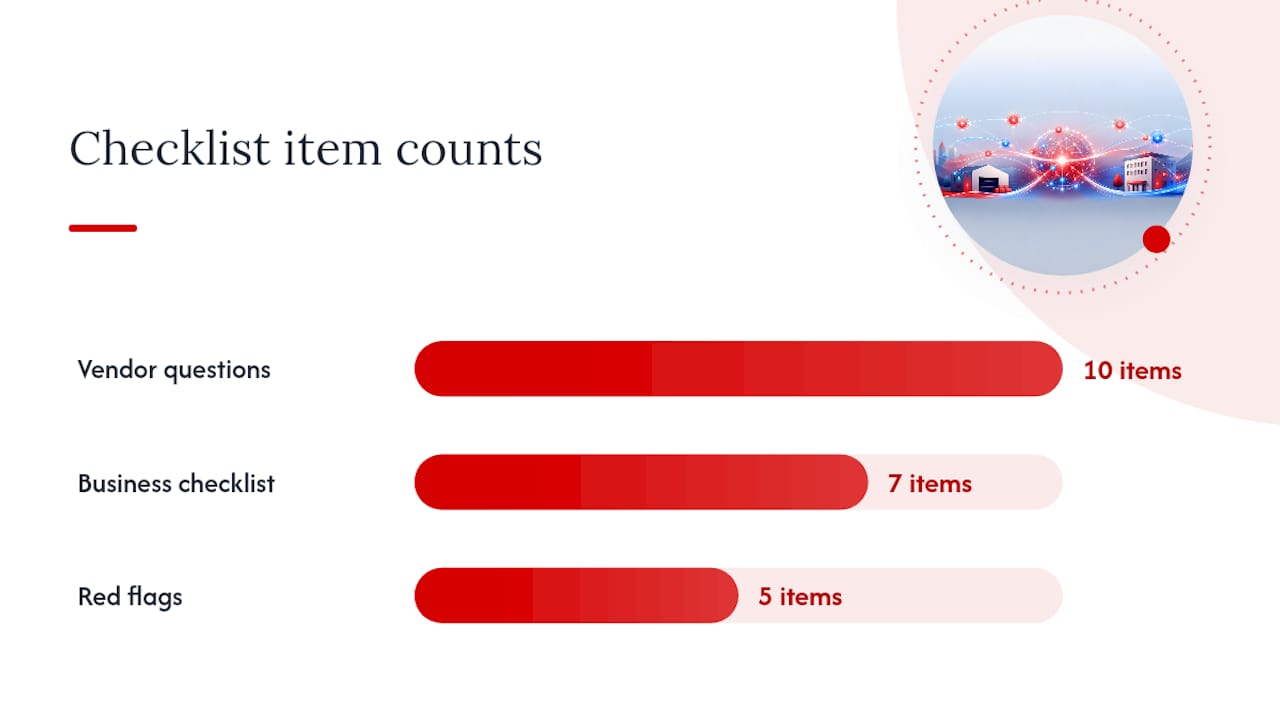
Business requirements checklist:
- How many sites need to be connected, and what are the current internet connections at each?
- What are your most critical applications (VoIP, cloud ERP, Microsoft 365, EFTPOS)?
- Do you need LTE or 4G/5G backup at any site?
- What is your current WAN spend, and what is the budget ceiling for a new solution?
- Do you have internal IT staff who can manage configuration, or do you need a fully managed service?
- What are your security requirements (compliance, encryption standards, firewall integration)?
- What cloud platforms do you rely on (Azure, Microsoft 365, AWS)?
Ten questions to ask any SD-WAN vendor or MSP:
- What uptime SLA do you guarantee, and how is it measured and reported?
- What is your escalation path if a site goes down outside business hours?
- Can you provide on-site support, or is everything remote?
- What vendor certifications do you hold (Fortinet, Cisco, VMware partner status)?
- How is traffic encrypted between sites, and what encryption standard is used?
- Does your solution integrate with Azure Virtual WAN or our existing Microsoft 365 environment?
- Can we run a pilot or proof-of-concept at one site before committing to a full rollout?
- How are firmware and security patches managed, and how quickly are critical patches applied?
- What monitoring and reporting do we get, and how often do we receive performance reports?
- What happens to our configuration and data if we end the contract?
Red flags to watch for:
- Pricing that is opaque or changes significantly between quote and contract.
- No pilot or proof-of-concept option offered.
- SLA that covers only hardware replacement, not application performance or uptime.
- No clear answer on hybrid connectivity (what happens if you want to add an LTE link later).
- Certifications claimed verbally but not documented.
On pricing and timeline: most managed SD-WAN services for small businesses are priced as OPEX subscriptions, typically per-site per-month, covering hardware, software licences, monitoring, and support. CAPEX appliance models require upfront hardware spend plus ongoing licence fees. A realistic rollout for a two-to-five-site small business runs 2–8 weeks from contract to full cutover, depending on site complexity and whether zero-touch provisioning is available.
How to deploy SD-WAN: a practical roadmap for small businesses
A small-business SD-WAN rollout typically runs 2–8 weeks from kick-off to full cutover, assuming two to five sites and a managed provider handling configuration. Here is what that looks like in practice.
Deployment steps:
-
Discovery and baseline testing (Week 1): document existing connections, applications, and traffic patterns at each site. Run speed and latency tests. Identify critical applications and their performance thresholds. A small business IT setup review at this stage prevents surprises later.
-
Pilot site selection and configuration (Week 1–2): choose one site — usually head office — for the initial deployment. Configure edge device policies, overlay tunnels, and failover rules. Test failover manually before going live.
-
Equipment staging (Week 2): pre-configure edge devices for remaining sites in a lab or staging environment. Zero-touch provisioning means devices arrive at branch sites ready to plug in.
-
Phased rollout (Weeks 2–5): bring sites online one at a time. Verify connectivity, application performance, and failover at each site before moving to the next.
-
Cutover and verification (Week 5–7): decommission old WAN connections or retain them as backup. Run parallel for at least one week if budget allows. Confirm SLA monitoring is active.
-
Ongoing optimisation (Week 8 onwards): review monthly performance reports, adjust policies as application needs change, and test failover quarterly.
Pre-deployment checklist:
- Current configuration backups for all routers and firewalls.
- Documented fallback plan if the cutover fails (who to call, what to revert to).
- Contact list for ISPs at each site.
- Scheduled maintenance window for cutover (outside business hours).
- Test traffic schedule agreed with the managed provider.
For small IT teams, change control does not need to be complex. A simple change log noting what was changed, when, and by whom is enough to troubleshoot quickly if something goes wrong post-cutover.
Which SD-WAN technologies should you know about?
This is a technology orientation, not a ranked list. The three platforms you will encounter most often in the SME market each have a distinct character, and knowing that character helps you ask better questions.
-
Fortinet SD-WAN: security-first. Fortinet’s approach combines SD-WAN and next-generation firewall on a single edge device, which means you get WAN optimisation and intrusion prevention without a separate appliance. Works with business NBN, LTE, and private links. Strong choice for businesses with compliance requirements or those replacing an ageing firewall at the same time. Fortinet partner certification is worth verifying — it indicates the MSP has passed vendor training on configuration and support.
-
Cisco Meraki: cloud-native management. Meraki’s strength is its dashboard: every device, every site, every policy managed from one browser tab. Deployment is fast, monitoring is visual, and the learning curve for IT staff is low. Works well for businesses already in the Cisco ecosystem or those prioritising ease of management over deep security customisation. Cisco partner status (particularly Meraki-specific authorisation) is the credential to ask for.
-
VMware SD-WAN (VeloCloud): channel-centric and enterprise-proven at SME scale. VMware’s platform is widely used by MSPs because of its flexible orchestration and strong Azure Virtual WAN integration, making it a natural fit for businesses running Microsoft 365 or Azure workloads. VMware partner certification signals the MSP has been through structured training on the orchestration layer.
A note on integration: whichever platform you choose, confirm it supports your cloud providers natively. Azure compatibility, in particular, matters if you are mid-migration or planning a Microsoft 365 migration alongside the SD-WAN rollout. Running both projects in parallel is feasible and often efficient — the SD-WAN overlay can prioritise Microsoft 365 traffic from day one.
How Westerntechnology implements SD-WAN for Perth small businesses
Westerntechnology’s approach starts with a discovery session before any hardware is ordered. The goal is to understand your current connections, your critical applications, and where your network is actually failing — not where you think it is failing. That distinction matters more than most business owners expect.
The implementation process covers:
- Discovery and design: site survey (remote or on-site), baseline performance testing, and a written network design document before any equipment is ordered.
- Equipment staging: edge devices are pre-configured and tested before they arrive at your site, minimising on-site installation time.
- Cutover: scheduled outside business hours with a documented rollback plan. Westerntechnology handles vendor liaison with your ISPs.
- SLA and monitoring: ongoing monitoring of link quality, failover events, and application performance, with monthly reporting and proactive alerts.
- Ongoing optimisation: policy adjustments as your business changes, firmware patching, and quarterly failover testing.
Under a managed service engagement, Westerntechnology owns monitoring, patching, vendor liaison, and escalation. Your team does not need to understand the underlying configuration — you get a monthly report and a phone number to call if something feels wrong.
Pro Tip: Before your discovery session, pull three months of internet invoices from each site and note any outages or slow periods your staff have complained about. That data cuts the discovery phase in half and gives the engineer a real baseline to design against.
Westerntechnology holds vendor certifications relevant to the platforms used in small-business deployments. A proof-of-concept pilot at a single site is available for businesses that want to validate performance before committing to a full rollout — a low-risk way to see the technology working in your actual environment. For businesses considering the benefits of outsourcing managed IT support, a managed SD-WAN engagement is a natural extension of that model.
When SD-WAN is the right move, and when it is not
The case for SD-WAN is strongest when at least two of these apply: you have more than one site, you depend on cloud applications for daily operations, your current broadband is unreliable, or you need LTE backup without paying for a second fixed-line circuit. Cloud migration and hybrid work — the primary SMB drivers identified by Techaisle — are exactly the conditions where SD-WAN earns its cost.
Where I see small businesses get this wrong is in treating SD-WAN as a fix for a fundamentally inadequate internet connection. If your NBN plan is undersized for your actual usage, SD-WAN will manage that bandwidth more intelligently, but it cannot create capacity that does not exist. Sort the underlying connectivity first.
The other mistake is underestimating the management overhead of a self-managed appliance. The hardware is affordable. The time spent configuring, patching, and troubleshooting it is not. For a business without a dedicated IT person, a managed service is not a premium option — it is the only option that actually works long-term.
My recommendation holds from the opening: a managed SD-WAN pilot at one site, with a provider who can show you vendor certifications and a written SLA, is the right first step for most small businesses.
Westerntechnology’s managed SD-WAN service for Perth businesses
Skipping the complexity of self-managed appliances and going straight to a fully managed SD-WAN service is the concrete advantage Westerntechnology offers Perth small businesses. You get the technology without the configuration burden, and you get a local team who can be on-site when remote support is not enough.
Westerntechnology’s managed IT services cover the full SD-WAN stack: network design, equipment staging, cutover, cybersecurity integration, Microsoft 365 optimisation, and ongoing monitoring under a written SLA. For businesses already on a managed IT support contract, adding SD-WAN is a natural extension rather than a separate project.
A single-site proof-of-concept pilot is available for businesses that want to validate performance before a full rollout. Contact Westerntechnology for a discovery session and a written proposal — the starting point is a conversation about your current connections and your most critical applications, not a sales pitch.